
Why an ad blocker makes your internet faster
Ads aren’t just annoying — every one of them is extra images, video, and tracking scripts your device has to download. Block them and the web gets lighter, cheaper, and noticeably faster.
July 3, 2026 · 8 min read
TL;DR — On many sites, ads and trackers make up the majority of what you download. They pull in heavy images, auto-play video, and dozens of third-party scripts — wasting your bandwidth, your data plan, and your time. Blocking them means fewer requests and far less data, so pages load dramatically faster.
When you open a modern web page, you expect to download the page. In reality, a huge share of what arrives has nothing to do with the content you came for. It’s advertising: banner images, video pre-rolls, tracking pixels, and a stack of scripts that run real-time auctions to decide which ad to show you — all before you’ve read a word.
All of that has a cost, and you’re the one paying it — in bandwidth, in load time, and on mobile, in your data allowance. Here’s exactly where it goes, and why removing it speeds everything up.
What actually loads when an ad appears
A single ad slot is rarely a single image. Filling it can trigger a cascade of network activity:
Heavy creatives
High-resolution banner images and auto-playing video — often the single biggest files on the page.
Ad-tech scripts
JavaScript for ad servers, real-time bidding, and measurement — each an extra download that also runs on your CPU.
Third-party requests
Ads chain out to dozens of external domains, each needing its own DNS lookup and connection setup.
Tracking pixels
Tiny requests whose only job is to profile you — small individually, but they add up across every page.
Multiply that by every ad slot on a page, and a simple article can balloon into hundreds of requests and several megabytes — most of it advertising, not content.
How ads steal your bandwidth
Bandwidth is finite — especially on mobile data or a slow connection. Every byte spent on an ad is a byte not spent on the thing you actually want. The waste shows up in three ways:
- Page weight explodes. Ad-heavy pages can be several times larger than the same page ad-free, because creatives and scripts dominate the download.
- Requests pile up. Each ad and tracker is a separate round-trip — DNS, connection, transfer — and browsers can only do so many at once, so the page stalls.
- It never stops. Auto-refreshing ads, lazy-loaded video, and retargeting pixels keep downloading while you read, quietly draining your data.
On a metered mobile plan this is real money. On any connection, it’s time you spend staring at a loading spinner.
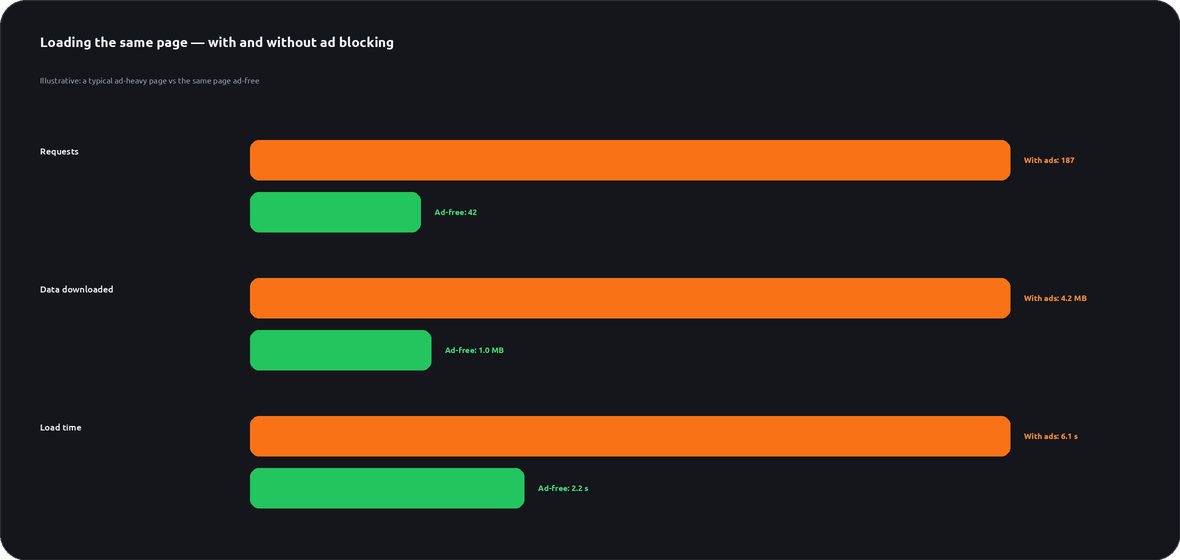
The same page, with and without ads
Watch what happens to requests, data, and load time when ad blocking is on. Hit reload with the blocker off, then on:
Illustrative demo. Real numbers vary by site, but the pattern — far fewer requests and much less data — is consistent.
Why ad-free is simply faster
Removing ads doesn’t just save data — it speeds up every stage of loading a page:
Fewer requests
Nothing to fetch from ad networks means the browser finishes the page sooner.
Lighter pages
Less data to download over the network — a huge win on slow or mobile connections.
Less work for your device
No ad scripts to execute means lower CPU use, smoother scrolling, and better battery life.
Faster time-to-read
Content appears and becomes interactive quickly, instead of jumping around as ads load in.
How much data are ads costing you?
Drag to match how many pages you open on a typical day and see the bandwidth an ad blocker could save you every month:
Illustrative estimate based on roughly 2.5–3 MB of ads and trackers saved per page. Real savings depend on the sites you visit.
Faster is just the start: the other wins
Speed is the headline, but blocking ads pays off in more ways than one:
Privacy
Most ad requests are also tracking requests. Blocking them cuts the profiling that follows you around the web.
Battery & data
Less downloading and less script execution means longer battery life and a smaller mobile-data bill.
Security
“Malvertising” hides malware inside ads. Fewer ad requests means a smaller attack surface.
A calmer web
No pop-ups, auto-play video, or content that jumps as ads load. Just the page you came for.
How LunoVPN blocks ads everywhere
Browser extensions only clean up your browser. LunoVPN’s built-in ad blocker works at the network level, so it filters ads and trackers across your whole device — every browser and app — without installing anything extra.
Device-wide
Blocks ad & tracker domains for every app, not just one browser.
DNS-level filtering
Ad domains are stopped before they’re ever contacted — so the data is never downloaded at all.
One toggle
Turn it on in the app and it just works, alongside your VPN encryption.
No-logs, as always
Filtering happens without recording what you browse. Privacy stays intact.
Because the request is stopped at the DNS level, the ad’s images and scripts are never fetched — which is exactly why your pages get lighter and faster.
Browse lighter with LunoVPN
Block ads and trackers across your whole device, save bandwidth, and speed up every page — with a private, no-logs VPN.
Get LunoVPN