
The fast, no-logs VPN app for Android
Protect your Android phone or tablet with military-grade encryption, a strict no-logs policy, and one-tap privacy. Unblock content, stop trackers, and stay safe on any Wi-Fi — across 127 locations worldwide.
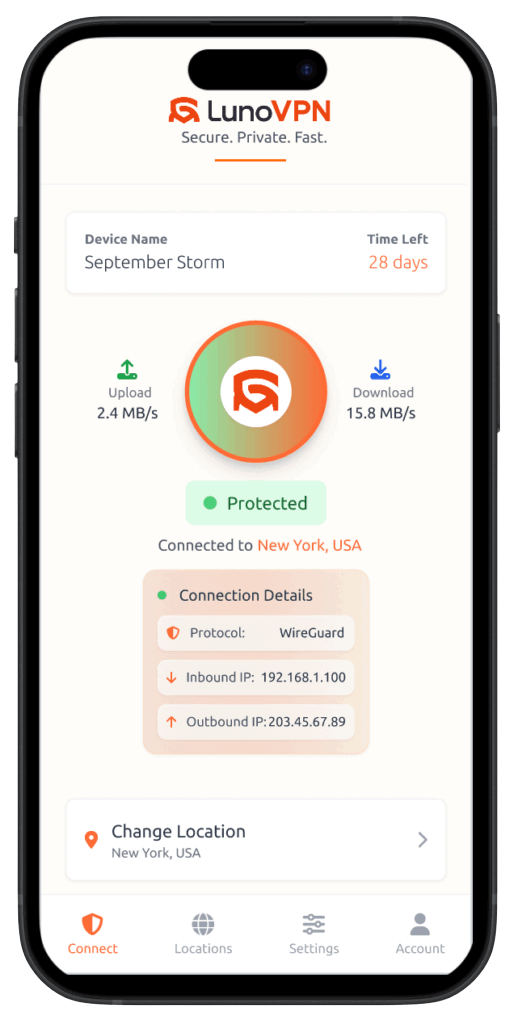
Why you need a VPN on Android
Your Android phone is with you everywhere — and it’s constantly connecting to networks you don’t control. Without a VPN, your mobile carrier, Wi-Fi provider, and the apps themselves can see your real IP address and profile what you do. A VPN for Android wraps every connection in strong encryption, so your traffic stays private on any network.
LunoVPN is a lightweight native Android app that protects your whole device with a single tap. It hides your IP behind one of 127 server locations, encrypts your DNS to prevent leaks, and keeps a strict no-logs policy — so there’s nothing to hand over about what you browse, stream, or download.
What a VPN does on your Android phone
- Encrypts every app at the system level, from your browser to banking and messaging.
- Secures public Wi-Fi in cafés, airports, and hotels where networks are easy to snoop.
- Hides your IP and location so sites, apps, and your carrier can’t track you.
- Unblocks content by connecting to servers in other regions.
- Stops throttling when your carrier slows specific apps or video.
Built on modern, mobile-first tech
The same engineering that powers LunoVPN everywhere, tuned to be fast and gentle on your Android battery.
LunoGuard protocol
Our WireGuard-based protocol delivers near-instant handshakes and high throughput on mobile.
AES-256 & ChaCha20
AES-256-GCM and ChaCha20-Poly1305 — ChaCha20 is ideal for phone CPUs and battery.
RAM-only, no-logs
Diskless servers wiped on reboot, with a strict zero-log policy baked in.
DNS leak protection
Every lookup is encrypted and routed through the tunnel — never your carrier’s DNS.
Kill switch
If the tunnel drops, all traffic is blocked instantly so nothing leaks.
Obfuscation
Disguises VPN traffic as HTTPS to get through restrictive mobile networks.
Split tunneling
Choose which apps use the VPN and which connect directly.
Battery optimized
Efficient keep-alives and ChaCha20 keep power use low all day.
Watch your data get encrypted
Everything leaving your Android is scrambled with military-grade encryption. Switch the cipher and see your readable data turn into unreadable ciphertext:
Route each app your way
Split tunneling lets you send sensitive apps through the encrypted tunnel while trusted or local apps connect directly. Flip each app and watch it move:
If the tunnel drops, nothing leaks
On mobile you switch between Wi-Fi and data all the time. If the VPN ever drops mid-switch, the kill switch blocks every app instantly — press the button to simulate a drop:
How to set up a VPN on Android
Installing LunoVPN on your Android phone or tablet takes under a minute, straight from the Google Play Store:
Install from Google Play
Open the Play Store, search for LunoVPN, and tap Install — or use the button below.
Sign in
Open the app and sign in with your LunoVPN account number or credentials.
Allow the VPN connection
Android will ask permission to set up a VPN — tap OK once to trust LunoVPN.
Choose a location
Pick from 127 locations, or let Best for You select the fastest server.
Tap Connect
One tap and your entire phone is protected. That’s it.
Works on phones & tablets
LunoVPN runs on modern Android devices — phones, tablets, and beyond:
What to look for in an Android VPN
| Feature | Why it matters on Android | LunoVPN |
|---|---|---|
| Strict no-logs | Your mobile activity stays private | Yes |
| AES-256 & ChaCha20 | Strong, battery-friendly encryption | Yes |
| Kill switch | No leaks when switching Wi-Fi / data | Yes |
| Split tunneling | Per-app control on mobile | Yes |
| Obfuscation | Connect on restrictive networks | Yes |
| Battery optimized | All-day protection | Yes |
| Unlimited bandwidth | No caps on mobile data through the VPN | Yes |
Android VPN — frequently asked questions
Do I need a VPN on my Android phone?
How do I download LunoVPN for Android?
Is LunoVPN for Android really no-logs?
Which encryption does the Android app use?
Will a VPN drain my Android battery?
Does the kill switch protect me when I switch Wi-Fi to data?
Can I choose which apps use the VPN?
How many devices can I use?
Is using a VPN on Android legal?
Related LunoVPN guides & features
Get the best VPN for Android
Fast, private, and no-logs — protect your phone in under a minute.
Get it on Google Play